
By Abhinav Tiwari | DBOSeven
This is my first post on DBOSeven. I have been busy working with multiple clients, and writing has kept getting pushed back. Whenever I get some time, I will try to write about the database work I am doing, the issues I come across, and what I learn from them.
I wanted to start with a small contribution I made to sp_BlitzIndex. I see Brent Ozar’s scripts on many of the client SQL Servers I work with, and I use them myself. So it felt good to contribute something to a tool that is already part of my work.
Why I wanted more context beside Days Uptime
When I review an index, I look at how much it has been read and how much work SQL Server is doing to maintain it. If the reads are low, it is reasonable to investigate whether that index is still needed. But the period behind those numbers matters.
In an Always On Availability Group, the Days Uptime value can be easy to read as the amount of application history behind the index-usage counters. If SQL Server has been running for several weeks, we may assume those counters represent several weeks of the workload we are investigating.
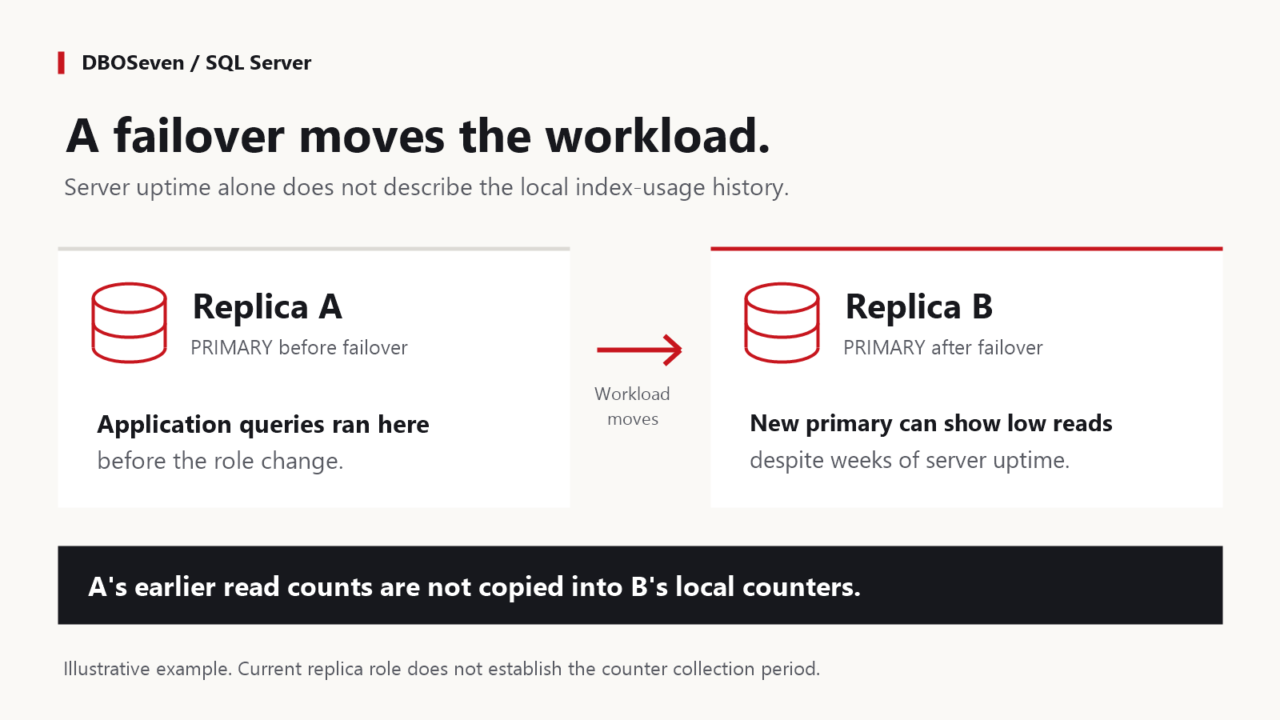
Consider an example with two replicas. The application has been using replica A as the primary for several weeks. Yesterday, a planned AG failover moved the primary role to replica B, and the application reconnected to B. Neither SQL Server instance restarted, so B can still show several weeks of uptime.
Now we connect to B and run sp_BlitzIndex. The application workload has moved, but A’s earlier index reads have not been added to B’s local usage counters. An index that was regularly read on A could show very little read activity on B. The uptime on B does not tell us how long it has been serving that application workload.
B may also have handled reporting queries while it was a readable secondary. So I cannot assume its counters represent only the time since it became primary. I need to check where the relevant queries ran and what history is actually available.
There are other reasons for a shorter history too. Microsoft documents that index-usage counters are cleared when the database engine starts, and that a database shutdown or detach removes its rows from the DMV. I wanted a reminder to check the history before treating a low read count as a reason to remove an index.
What I contributed to sp_BlitzIndex
My change in PR #4123 adds the database’s AG name and current local replica role to the Messages output. It also adds this reminder beside the uptime banner: Local usage history may differ from uptime. In an all-database run with AG context, the banner uses AG: per database, with the individual database details in the messages.
The change does not calculate the last failover time, reconstruct missing history, or combine counters from different replicas. The existing uptime and index-benefit calculations stay unchanged. It gives us more context while reading the results.
The PR links to an earlier request from AkselRohtsalu, raised in January 2022, for AG uptime information. My contribution takes a smaller step by showing the current role and reminding us about the limits of local usage history.
Brent merged the PR into the First Responder Kit’s dev branch on 19 September 2026. Thank you, Brent, for accepting the contribution.
As of 3 October 2026, the latest published release is still dated 8 July 2026, so this change is in dev and is not included in that release.
Before calling an index unused
A low read count is useful evidence, but I would not make a removal decision from that number alone. I also need to know where the relevant queries ran and whether the available history includes the workload I care about, including less frequent reporting or scheduled jobs.
SQL Server may have been running for weeks, but the current replica may have started serving this application workload only recently. Its local index-usage counters do not include the reads that ran on the previous primary.
Before acting on the next apparently unused index in an AG, check the replica role and known failovers against your monitoring history. If you do not have representative usage history from the replicas serving that workload, collect it before deciding to remove the index.
Discussion